Local SEO for clinics
Picture this. Someone in your town types "lip filler near me" or "skin clinic near me" into their phone. Three clinics appear in the Google map pack, each with photos, a star rating, and a call button. If yours isn't one of them, that client is probably booking somewhere else before they've even seen your website.
| Your Google Business Profile is often the first thing a new client sees, before your website, before your Instagram, before they ever speak to you. |
|---|
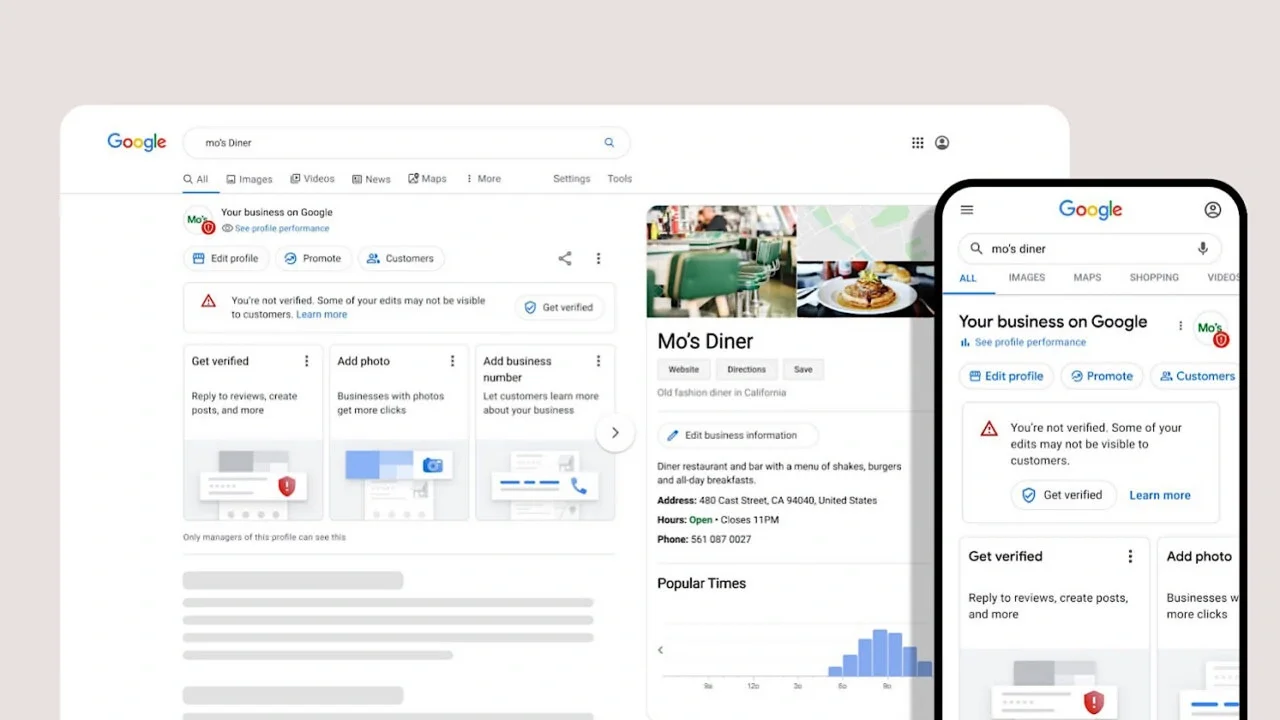
The good news? A properly built profile is free, quick to put together, and works for you around the clock. This guide shows you how to set up a Google Business Profile for your aesthetic clinic step by step, whether you're starting from scratch or tidying up a listing that's been left alone for years.
There's one catch. Clinics in the UK and Ireland have extra rules to follow, and the biggest risk isn't a blurry photo. It's a Google post that advertises a prescription-only medicine, or a review reply that accidentally confirms someone was a client. We'll cover both as we go.
What is a Google Business Profile (and why does it matter for clinics)?
A Google Business Profile (formerly Google My Business) is the free listing that appears when people find you on Google Search and Google Maps. It's the panel beside the search results on a desktop, and the card that pops up when someone taps your pin on a map.
It shows the essentials at a glance: your name, address, opening hours, phone number, website, booking link, photos, reviews, and the treatments you provide. For many clients, it answers every question they have before they decide whether to call.
Then there's the local map pack, the block of three businesses Google shows above the regular results for local searches. For clinics, this matters more than it does for most businesses. Treatment searches are almost always local and high intent. Nobody searching "aesthetic clinic near me" is browsing for fun; they're looking for somewhere to book. That's why local SEO for aesthetic clinics starts here, and why your profile is the foundation of Google Maps ranking for clinics in your area.
Before you start: what you'll need
Gather these before you create a Google Business Profile and the whole process goes far more smoothly.
• A Google account you'll keep long term, ideally a business account rather than a staff member's personal one
• Your exact business name as it appears on your signage and paperwork
• Your address, phone number, and website URL
• Your opening hours, including evenings and weekends
• A list of treatments, split into those you can promote and those that must be framed as a consultation
• Your logo, plus exterior, interior, and team photos
• The direct link to your online booking system
• Proof of address, with your signage clearly visible for verification
How to set up your Google Business Profile, step by step
This is the core of your Google Business Profile setup. Work through it in order, and don't rush the categories or the services list; that's where most clinics win or lose.
1. Check whether your clinic already has a profile
Google sometimes creates listings automatically, so search your clinic's name in Google Maps first. If a profile exists, claim it rather than creating a duplicate. Claiming your Google Business Profile keeps existing reviews in one place, while duplicates confuse Google and split your ranking signals.
If a former owner, an ex-employee, or an old agency controls the listing, use the request access option in Business Profile Manager. The current owner gets time to respond, and if they don't, Google will usually give you a way to take over.
2. Add your business name, location and contact details
Use your real-world business name only, exactly as it appears on your signage. A name like "Glow Clinic Botox and Fillers Dublin" breaks Google's guidelines and risks suspension, and because it names a prescription-only medicine, it breaches advertising rules too.
Next, choose between a storefront and a service area business. Most clinics are storefronts. Mobile practitioners can hide their address and set a service area instead, which is also how a Google Business Profile for a home-based aesthetic clinic should work: clients see your area, not your front door.
Finally, keep your name, address, and phone number identical on your website, directories, and booking platform. This NAP consistency across citations is a cornerstone of local SEO, because it helps Google trust your details.
3. Choose the right categories
Choosing Google Business Profile categories for aesthetic clinics is where plenty of owners go wrong. Your primary category has the biggest influence on which searches you appear for. Google allows one primary and up to nine secondary categories, but resist ticking every box. Pick categories that describe what your clinic is, not every treatment on your menu.
To find the best Google Business Profile category for an aesthetic clinic, look at what your top local competitors use. Category names vary by region, so always check the live list as you type.
| Area | UK | Ireland |
|---|---|---|
| Medical aesthetics clinic | Medical spa or Skin care clinic | Laser hair removal service, Facial spa |
| Skin and laser clinic | Skin care clinic | Laser hair removal service, Medical spa |
| Beauty salon with advanced treatments | Beauty salon | Facial spa, Skin care clinic, Waxing hair removal service |
| SPMU studio | Permanent make-up clinic (if available) | Beauty salon, Eyebrow bar |
If you're working out how to set up a Google Business Profile for a beauty salon, the same logic applies: lead with what most clients come to you for.
4. Verify your profile
If your dashboard says "Google Business Profile not verified", that's often why your clinic isn't appearing in search. Google decides which verification methods you see, based on your business type, location, and hours.
Google Business Profile video verification is now the most common. You'll record a short, unedited video showing your signage, your treatment room, and proof you manage the business, such as a utility bill or your keys. Phone, email, postcard, or instant verification through Google Search Console appear for some profiles, so if you're wondering how to verify Google Business Profile without a postcard, the answer for most clinics is video. Google says reviews can take up to five business days.
To verify your Google Business Profile first time, record during opening hours, make sure your signage is clearly visible, and don't edit key details while verification is pending.
5. Write a business description that builds trust
Your Google Business Profile description allows 750 characters, but the first 250 or so do the heavy lifting. Say who you are, where you are, and who leads the clinic, then add credentials you genuinely hold: JCCP registration, Save Face accreditation, BABTAC or VTCT qualifications for beauty therapists, professional registration for medical practitioners, and HIQA or CQC registration where it applies.
Mention non-POM treatments naturally and refer to anti-wrinkle treatment only as a consultation. Keep links, prices, and claims like "best in Dublin" out of your business description entirely.
| Example description: Lumen Skin Clinic is a medical aesthetics clinic in Ennis, Co. Clare, led by Dr Sarah Byrne, a doctor registered with the Medical Council. We offer consultations for lines and wrinkles, alongside dermal fillers, skin boosters, chemical peels, microneedling, and laser hair removal. Every treatment begins with an in-depth consultation, and our team holds recognised qualifications in advanced skin treatments. Free on-site parking and Thursday evening appointments are available. |
|---|
6. Add your services the compliant way
The services list is where most clinics slip up. When you add services to your Google Business Profile, every line is public-facing advertising. So when owners ask "can I advertise Botox on Google Business Profile?", the short answer is no.
| Fine to list | Risky or non-compliant |
|---|---|
| Dermal filler treatments | Botox, Bocouture, Azzalure (product names of a POM) |
| Skin boosters, chemical peels, microneedling | Anti-wrinkle injections with a price |
| Laser hair removal, body contouring | "Cosmetic injections" as a standalone service |
| Consultation for lines and wrinkles | Weight-loss injection offers |
| Compliance note (UK): Advertising Botox on Google in the UK isn't allowed, whether it's a paid ad, a post, or a line in your services list. CAP Code rule 12.12 and the Human Medicines Regulations 2012 prohibit advertising prescription-only medicines to the public, and the ASA and MHRA enforce these prescription-only medicine advertising rules. The ASA has ruled against Google ads promoting POMs, and upheld complaints against Therapie Clinic UK over an ad for "Cosmetic Injections" because it indirectly promoted Botox. Compliance note (Ireland): The Medicinal Products (Control of Advertising) Regulations 2007 and section 11.16 of the ASA Ireland Code apply the same principle. The HPRA's guidance covers websites and social media, including services that may lead to the prescription of botulinum toxin, semaglutide, or tirzepatide. In short, HPRA advertising rules in Ireland treat your Google profile like any other advert. |
|---|
This isn't a theoretical risk. A 2025 ASA Ireland monitoring project found potential breaches on 79 of 123 clinic websites reviewed (64%), and CAP Code rules for aesthetic clinics apply just as firmly to your Google profile.
What you can promote is the consultation. "Consultation for lines and wrinkles" is a safe service name, with no price, offer, or product name; the same goes for weight-loss injections. Non-POM treatments such as dermal fillers, skin boosters, chemical peels, microneedling, laser hair removal, body contouring, and semi-permanent makeup can be listed with descriptions, and the same rules cover any products you add. Keep descriptions measured: no guaranteed results, no "pain-free", and no "permanent" unless it's accurate.
7. Set your hours, contact options and booking link
Add your opening hours, then use special hours for bank holidays and Christmas. Few things lose a client's trust faster than a locked door.
Next, add a booking link to your Google Business Profile that goes straight to your booking system, not your homepage. Google labels this an appointment URL. The built-in "Book" button through Reserve with Google is only available for certain categories and booking partners, so most clinics add the link manually.
Add UTM tracking to your website and booking links so bookings from Google show up in your analytics. Alongside the performance insights in your dashboard, including calls, direction requests, and website clicks, you'll see what your profile actually earns you.
8. Upload photos and video
Google Business Profile photos do a lot of selling before anyone walks in. Upload your logo, a cover photo, an exterior shot so people can find you, reception, treatment rooms, and your team, plus a short video tour. Real photos always beat stock images.
| Before and after photos: Only upload these with the client's documented consent. Images must not be edited, filtered, or lit to exaggerate results, as ASA/CAP rules on misleading imagery apply. Never post before-and-afters for anti-wrinkle injections, since that promotes a prescription-only medicine. |
|---|
9. Add attributes
Attributes are labels such as wheelchair access, online appointments, women-led, or LGBTQ+ friendly. Only select what's true. A wrong attribute (say, step-free access when there are stairs) creates a poor first visit and, often, a poor review.
Already have a profile? A 10-minute audit for established clinics
If you've ever typed "why is my clinic not showing on Google Maps" into a search bar, or wondered how a newer clinic down the road is outranking you, start here. Active, accurate profiles tend to outperform older ones that have been left to drift. Run through these quick checks:
• Is the profile verified, and are you the owner (not an ex-employee or an old agency)?
• Does your primary category still reflect what you mainly do?
• Have new treatments been added and discontinued ones removed?
• Does anything in your posts, offers, services, or business name mention a POM?
• When did you last add photos or a post?
• Are any reviews sitting without a reply?
• Do your hours match your website?
If any of these made you wince, that's your starting point. A focused hour is often enough to optimise your Google Business Profile and get it working again.
Google reviews: how to get more and reply safely
Google reviews for aesthetic clinics carry a lot of weight. Your star rating is one of the first things people notice in the map pack, and your reviews also feed the AI answers Google now shows on profiles.
Asking for reviews the right way
Most owners searching "how to get more Google reviews for my clinic" are hoping for a trick. There isn't one: ask every client, not just those you're sure will leave five stars. Google's policies ban review gating, and a direct review link sent by SMS or email alongside an aftercare check-in works well.
| Compliance note: Since 6 April 2025, the DMCC Act has banned fake reviews and concealed incentivised reviews in the UK, and the CMA's guidance (CMA208) expects businesses that publish reviews to have a review policy on fake and incentivised reviews. In Ireland, the Consumer Rights Act 2022 prohibits fake reviews and requires traders to take reasonable steps to check reviews are genuine. So: no reviews from staff, friends, or family, no buying reviews, and no "free treatment for a five-star review" offers. |
|---|
Replying without breaching confidentiality
Knowing how to respond to Google reviews as a clinic matters. A public reply should never confirm the reviewer was a client, mention a treatment, or discuss results or complications. Health data is special category data under GDPR, and regulated practitioners owe confidentiality to their regulator, whether that's the GMC, NMC, GDC, NMBI, or Medical Council. Patient confidentiality doesn't switch off in public.
| A great reply shows future clients how you handle things, without telling anyone who your clients are. |
|---|
Good review replies thank the reviewer, stay general, and take anything negative offline. If you're unsure how to reply to a negative Google review as a clinic, adapt these:
| Positive: "Thank you so much for taking the time to share this. Kind words like these mean a great deal to our whole team." Negative : "Thank you for your feedback. We take every comment seriously and would welcome the chance to talk this through privately. Please contact our clinic manager on [phone] or [email] so we can help." |
|---|
Posts and updates: keeping your profile active and compliant
Posts, offers, and updates keep your profile fresh and show both Google and clients that the clinic is active. Safe, useful ideas include:
• Introducing a new team member
• Launching a new non-POM treatment
• Aftercare tips
• Seasonal skincare advice
• Clinic news and awards
One warning: the POM rules apply to Google posts exactly as they do on Instagram. No posts or offers featuring anti-wrinkle injections, toxin brand names, or weight-loss injections, and no prices for them either. Offers on non-POM treatments, such as a skin booster course or a laser hair removal package, are fine as long as they're accurate.
Aim for a post every week or two. A rhythm you can actually keep up beats a burst of activity followed by six months of silence.
What's changed on Google Business Profiles recently
If you haven't looked at your profile in a while, a few things have moved.
• The Questions and Answers section has been phased out and is being replaced by Ask Maps, an AI feature powered by Gemini that answers questions using your profile, reviews, and website. It's rolling out gradually, so you may not see it in the UK or Ireland yet.
• The chat feature was switched off in July 2024.
The practical takeaway? Answers about your clinic increasingly come from your own content. A complete profile and a clear FAQ section on your website matter more than ever, because that's what Google draws on when someone asks a question.
How your profile and website work together
Think of it this way: the profile gets the click, and the website earns the booking. When someone taps through from Google, they should land on the most relevant page, not a generic homepage that makes them hunt for what they wanted.
Make sure the treatment pages on your website match the services on your profile, with the same names, the same compliant framing, and the same contact details. Because Ask Maps and Google's AI answers draw on your website, clear treatment pages and a well-written FAQ section feed straight back into how your profile performs. Strong local SEO for aesthetic clinics needs both working together.
If your profile is getting views but your diary isn't filling up, the website is usually the missing piece. A site built specifically for aesthetic clinics turns those clicks into consultations rather than quick exits.
Google Business Profile checklist for aesthetic clinics
☐ Profile claimed and verified under a business-owned Google account
☐ Business name matches signage exactly, with no keywords
☐ Address and phone number match the website and directories
☐ Primary category reflects what the clinic mainly does
☐ Relevant secondary categories added
☐ Description mentions location, lead practitioner, and credentials
☐ No POM product names, prices, or offers anywhere on the profile
☐ Toxin and weight-loss treatments framed as consultations only
☐ Services list complete, with measured descriptions
☐ Opening hours and holiday hours up to date
☐ Direct booking link added with UTM tracking
☐ Real photos of exterior, interior, and team uploaded
☐ Before and after photos unedited and consented
☐ Accurate attributes selected
☐ Review request process in place for every client
☐ Written policy on fake and incentivised reviews
☐ Every review gets a reply that protects confidentiality
☐ A post added at least every couple of weeks
☐ Profile reviewed every quarter
Frequently asked questions
Is a Google Business Profile free for aesthetic clinics?
Yes. Creating and managing a profile costs nothing. Google sells paid ads alongside it, but the profile itself, including posts, photos, and reviews, is completely free.
How long does it take to verify a Google Business Profile?
Google says verification reviews can take up to five business days, though video verification is often quicker. Avoid changing your name, address, or category while it's pending, as edits can hold things up.
What category should an aesthetic clinic choose on Google?
Choose the primary category that best describes what your clinic mainly does. For many medical aesthetics clinics, that's Medical spa or Skin care clinic. Check the live list and look at what your top-ranking local competitors use before deciding.
Can I mention Botox on my Google Business Profile?
No. Botox is a brand of botulinum toxin, which is a prescription-only medicine, so it can't be promoted to the public anywhere on your profile, including the name, description, services, posts, or offers. You can list a consultation for lines and wrinkles, with no price or product name.
Can I run a home-based clinic and still have a Google Business Profile?
Yes. Set your profile up as a service area business and hide your address, so clients see the area you cover rather than your home. You'll still need to verify, and Google may ask for proof that you operate the business.
Should each practitioner have their own Google profile?
Google allows practitioner listings for public-facing professionals, such as doctors or nurse prescribers. For most small clinics, though, one strong clinic profile performs better than several thin ones. If you do create practitioner listings, keep them accurate and consistent with the main profile.
How do I get more Google reviews for my clinic?
Ask every client, consistently, using a direct review link sent by SMS or email after an aftercare check-in. The simplest answer to how to get more Google reviews is to make the request part of your routine, rather than something you remember now and then.
Sources:
Ready to turn Google profile clicks into booked consultations?
Websites for Clinics builds SEO-ready websites for aesthetic clinics across Ireland and the UK, with built-in local SEO structure, schema markup, location pages, and content written specifically for the aesthetic sector.